Gumroad Store Importer
Hello Creators!
If you’ve ever wanted to move your products and customers over from Gumroad to Jinxxy, we have some exciting news to share - we have now made this possible!
With our new store importer, after you link your Gumroad account, it will detect your existing listings from Gumroad to import. You can then select any number of items to perform a ONE TIME import of your products’ details, customers and files over to your Jinxxy store.
*Please note that at this time, the tool does not support videos - so you will have to add them manually once imported if your listings contained any.
DISCLAIMER: If you add more listings to your Gumroad store in the future, you will not be able to import them using this tool. This tool is only intended for creators who want to migrate off of Gumroad.
The imported listings will show up under your products as drafts that won’t be published until you choose to. If your listing’s name is a duplicate of another item on your Jinxxy store, the two will be linked together and only one will be able to be visible on the marketplace at a time to avoid confusion.
Once the move is complete your customers will receive 1 of 3 notices, based on the connection between their Jinxxy & Gumroad -
If their Jinxxy and Gumroad accounts are linked - they’ll receive a notice that they can now access the product through Jinxxy, completely seamlessly in their inventory!
If they have a Jinxxy account under the same email as the one used for the Gumroad purchase, but the accounts are not linked - they will be asked to log in to connect the two together.
If the email they provided to Gumroad to purchase your product is not associated with a Jinxxy account, they will be asked to sign up & link their account.
*For the most seamless experience, we recommend announcing to your community that they should have their Gumroad linked to their Jinxxy accounts as soon as possible!
To link your customer’s Jinxxy account with their Gumroad account:
Navigate to “Account Settings” from the drop down menu under your profile’s navigation bar.
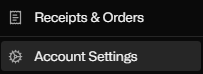
Scroll all the way to bottom of the Account Setting Tab > Connected Apps
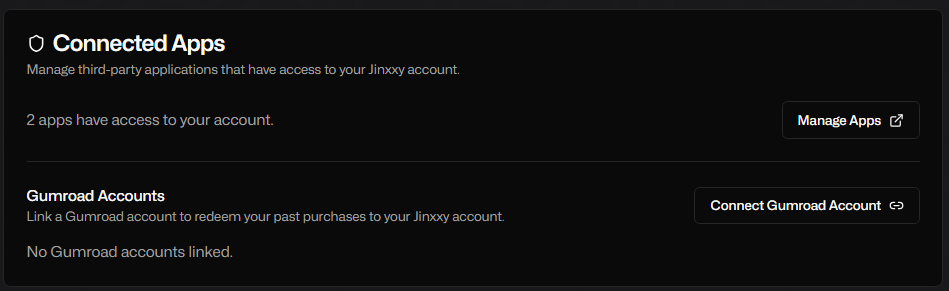
Locate the Gumroad Account Section and select “Connect Gumroad Account”

Once the customer claims the item, a new license key for that product on the Jinxxy platform will be made. If access to the product was revoked on Gumroad before this import, they will not be receiving it on Jinxxy.
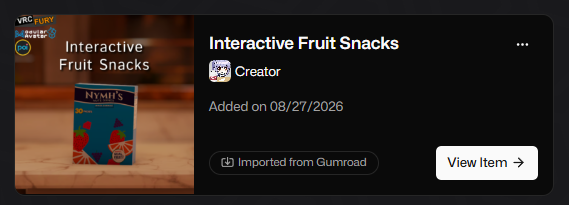
A successful product and license claim to the account will look like this and will be labeled with an “Imported from Gumroad” tag.
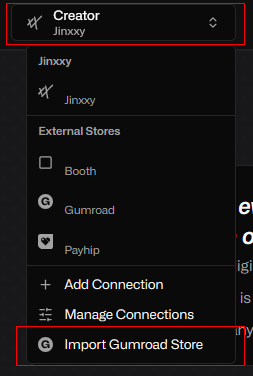
Ready to move your listings over? Then go to your creator dashboard at Jinxxy Creator Dashboard, select your store and click “Import Gumroad Store” to get started!
We’ve worked tirelessly to bring this feature to our community with a process as seamless as possible after receiving your valued feedback, the things we do wouldn’t be possible without you!
Thank you for your continued care and support as we strive to make the best platform possible!
Sincerely, the Jinxxy Team
FAQ
Q: I cannot link my Gumroad to my Jinxxy account, What does "Exchange Failed" in URL bar mean? / What does error message “Gumroad could not be connected” mean? / Gumroad is failing to connect to my account?
A: This is Gumroad rate limiting API calls. We’re looking into solutions for this, at this time we suggest waiting a while before trying to link Gumroad to your account again.
Q: What happens when you import a product from Gumroad? What is carried over?
A: When you import an item from Gumroad, it will create an unpublished version of your Gumroad listing on Jinxxy, so you can check the information and edit it. It will import files, product description, images, (videos are NOT supported, they will have to be manually added), and customers will receive an email to the address they provided to Gumroad for the purchase, and be granted a new license for the product on Jinxxy.
Q: What are the differences between unpublished, unlisted and published listings?
A: For all 3 types, as long as they have claimed it in their inventory they will be able to access the product.
Unpublished - Only you can see this product, ideal for editing.
Unlisted - Only users with direct links can see and purchase the product. It is not listed on the marketplace or your profile.
Published - Listed on the marketplace and your profile.
Q: What if I have duplicate / pre-existing listings on Jinxxy from Gumroad?
A: If you have the same listing on Gumroad as Jinxxy, if they have the exact same name and syntax, the importer will detect this and copy import the listing over from Gumroad as an unpublished, linked product to your Jinxxy store. This duplicate, linked listing will not be able to be published and will remain linked to the original Jinxxy listing, to avoid customer confusion when browsing the marketplace. Customers will be able to access the Gumroad version of the listing, and receive a license key for that variant.
Q: My listing names are different on Gumroad / Jinxxy but they’re the same product, what can I do to mark them as duplicate?
A: If they have different names, you will have to change them to the exact same name and syntax for titles and versions to denote them as a duplicate and the two will be linked. Otherwise this will be imported as a different product entirely. As of this time there’s no way to manually mark existing listings on Jinxxy as a duplicate of one you are importing from Gumroad.
Q: If I update a linked listing, will the other listing automatically update?
A: If you update one version of the listing, the other will not be automatically updated at this time. This means you will have to upload any updates twice at this time.
Q: Can I merge linked or duplicate listings?
A: We are looking into merging listings, but that functionality is not implemented as of this time.
Q: What happens to my Gumroad listing after the import?
A: Your Gumroad listing is not touched at all, customers will retain access to all of their goods on Gumroad. You will have to remove the Gumroad listing or turn off sales manually after the import.
Q: What emails will my customers receive when I import my listings? / How will my customers receive their purchases on Jinxxy post import?
A:
If their Jinxxy and Gumroad accounts are linked - they’ll receive a notice that they can now access the product through Jinxxy, completely seamlessly in their inventory!
If they have a Jinxxy account under the same email as the one used for the Gumroad purchase, but the accounts are not linked - they will be asked to log in to connect the two together.
If the email they provided to Gumroad to purchase your product is not associated with a Jinxxy account, they will be asked to sign up & link their account.
Q: Can I use this tool again in the future to import my Gumroad products?
A: The Gumroad Store Importer is a one-time use tool that snapshots your current Gumroad listings and brings them over to your Jinxxy store. This is intended for creators that want to move off of Gumroad, if you add new listings or new customers purchase listings you already imported on Gumroad, you will not be able to copy over the data again.